
Descrição
Smartcode Product Slider for WooCommerce turns the default WooCommerce product image gallery into an auto-rotating slider, without replacing WooCommerce’s own gallery or requiring any theme changes. Is a lightweight plugin that only adds 3.8KB JavaScript file to your website.
Features
- Automatically cycles through product gallery images on a timer.
- Adds Previous / Next controls to browse thumbnails, with keyboard support (Enter / Space).
- Only a configurable number of thumbnails are shown at a time; the thumbnail strip slides to keep the active thumbnail in view.
- Autoplay pauses when the visitor hovers the main product image, and resumes when they move away.
- For variable products, autoplay stops automatically as soon as the customer selects a full attribute combination, so it doesn’t fight with their choice.
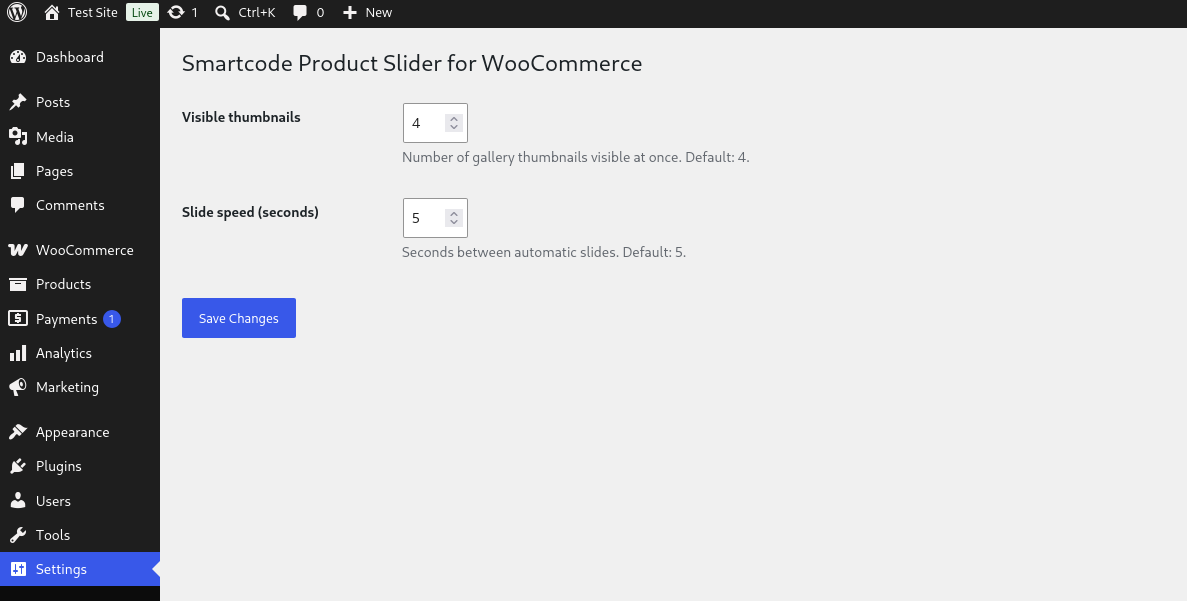
- Number of visible thumbnails (default: 4) and slide speed (default: 5 seconds) are configurable from Settings Gallery Slider for Woocommerce.
- No external JavaScript libraries or frameworks — a single lightweight, dependency-free script.
Requirements
This plugin requires WooCommerce to be installed and active, and only affects single product pages that have a gallery with more than one image.
Imagens de tela

Instalação
- Upload the plugin files to the
/wp-content/plugins/smartcode-product-sliderdirectory, or install the plugin through the WordPress plugins screen directly. - Activate the plugin through the ‘Plugins’ screen in WordPress.
- Make sure WooCommerce is installed and active.
- Optionally, go to Settings Gallery Slider for WooCommerce to change the number of visible thumbnails or the slide speed.
FAQ
-
Does this work without WooCommerce?
-
No. The plugin looks for WooCommerce’s product gallery markup on the page; without WooCommerce active there is nothing for it to slide.
-
Does it work with products that only have one image?
-
Yes, it simply does nothing in that case — there’s no gallery to slide.
-
Why does the slider stop when I pick a product variation?
-
This is intentional. Once a shopper selects a full attribute combination on a variable product, the slider stops so it doesn’t rotate away from the image they just selected.
-
Can I change how many thumbnails are visible, or how fast it slides?
-
Yes. Go to Settings Gallery Slider for WooCommerce in your WordPress admin to set the number of visible thumbnails (1-10) and the slide delay in seconds (1-60).
Avaliações

Contribuidores e desenvolvedores
“Smartcode Product Slider for WooCommerce” é um software com código aberto. As seguintes pessoas contribuíram para este plugin.
Contribuidores
Traduzir “Smartcode Product Slider for WooCommerce” para o seu idioma.
Interessado no desenvolvimento?
Navegue pelo código, dê uma olhada no repositório SVN ou assine o registro de desenvolvimento via RSS.
Registro de alterações
1.0.0
Initial public release.